IBM SPSS Data Collection Author

Create compelling, visually appealing surveys that participants will want to complete
- Overview
- Features and Benefits
- System Requirements
IBM® SPSS® Data Collection Author (formerly PASW® Data Collection Author), with its intuitive GUI and intelligent Wizards, makes it easy to create simple or complex surveys.
IBM SPSS Data Collection Author offers powerful functionality for creating attractive and penetrating surveys, with complete control over the creative process. The software is available in desktop or multi-user server editions.
- Drag-and-drop survey construction with an easy to use, intuitive interface
- Intelligent Wizards that guide you through the survey creation process
- Deployment in any language or any mode (Web, telephone, or through a mobile device such as a tablet)
- Incorporate sophisticated routings using if, go-to, skip and fill commands, or through list filtering, randomization, and rotation
- Use responses to guide what questions are asked and what lists of answers are presented, as well as what survey sections appear, and in what order.
- Advanced previewing and testing capabilities, including the ability to generate test data
- Surveys are coded to your analytical specifications and the survey logic is enforced to eliminate the need for data cleansing, making it easy to deliver insight to decision-makers quickly

IBM® SPSS® Data Collection Author, one of the authoring tools in the IBM SPSS Data Collection suite, enables marketers and survey professionals to create visually appealing surveys – with the ability to incorporate sophisticated routings and logic that encourages respondents to complete the survey.
A survey created with IBM SPSS Data Collection Author can be deployed in any mode and in any language – it is no longer necessary to create, manage and track different surveys for each deployment mode, language or both.
The powerful functionality of IBM SPSS Data Collection Author is available in Desktop and Server editions.
A guided approach to survey excellence
- Work in a familiar intuitive interface
- Use intelligent Wizards that guide you through the entire survey process, from survey authoring to reporting, or create your own with IBM SPSS Author Professional
- Customize example questionnaires and templates, or create your own
- Incorporate corporate style elements for consistent look-and-feel
- Ensure the look and feel of a survey is designed to increase respondent rates by re-using or modifying your own templates, or any inbuilt or customized templates
- Create lists that can be shared across multiple questionnaires and re-sued time and time again
- Preview and test surveys before they are launched to view what respondents would see
- Prepare for fast, easy reporting during survey creation by setting up analysis specifications such as analysis labels, top two boxes, or means responses
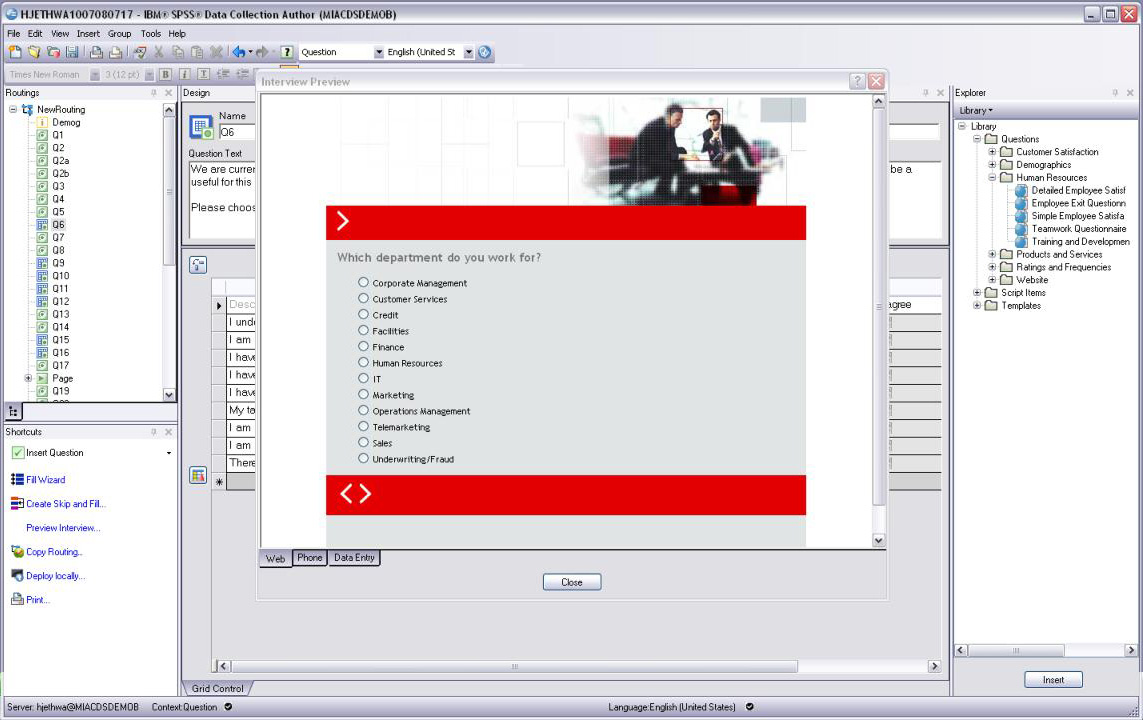
Preview questionnaire before you go live
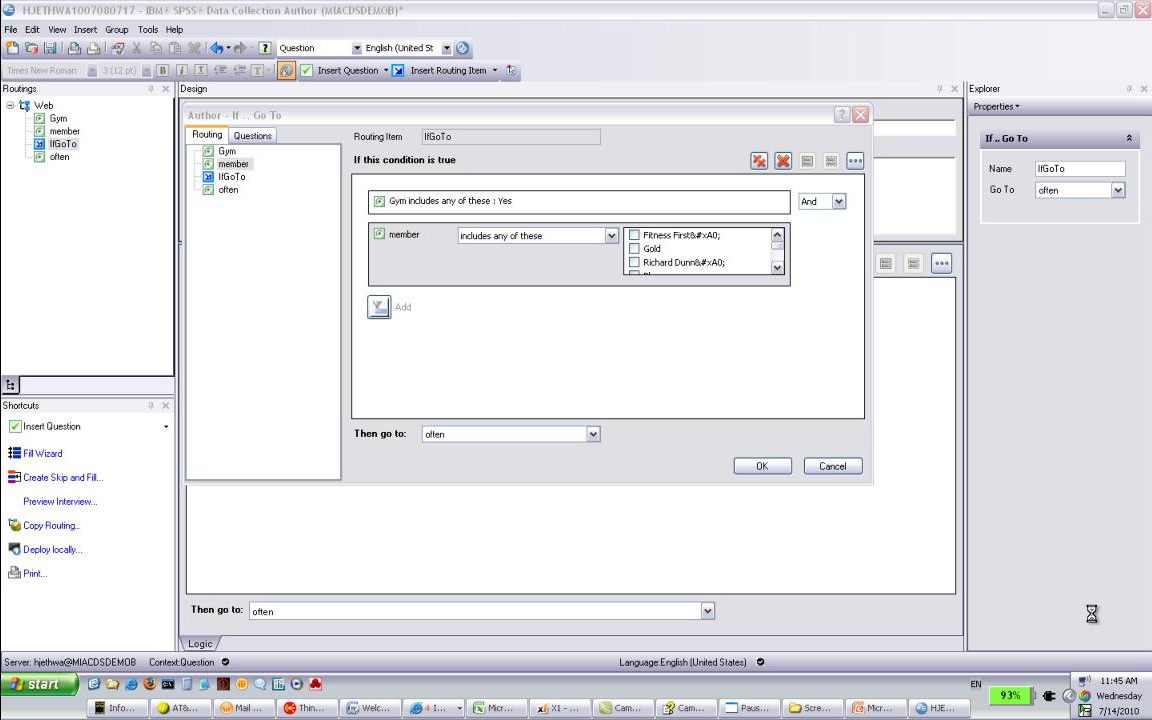
Easily enter logic and routing
Methodology to suit all surveys
- Tailor questions and phrasing to suit the Data Collection channel(s) you choose
- Easily create both simple and sophisticated surveys
- Include visual or interactive questions using sliders or calendars
Collaborate and share efficiencies
- Collaborate across the enterprise with IBM SPSS Collaboration and Deployment Services to eliminate duplication and inconsistencies while increasing survey creation efficiencies
- Extend operational efficiency and data consistency
- Share best practice and expert survey creation skills
What’s new in IBM SPSS Data Collection Author
Highlights
Activation. The activation process has beeen updated to support enhanced sample management, personal interviewing, telephone interviewing, and quota features.
The feature includes the following enhancements:- Participants - History Reports. The History Reports settings provide options for defining which fields will display in the contact and session history reports.
- Telephone - Interviewing - Introduction. The Introduction settings now include an editor that provides options for modifying a project's introductory text via HTML or plain text, and provides a mothod for switching between available languages.
- Telephone - Interviewing - Interviewer. The Interviewer settings now include the option Display status messages in Phone Participants. When the setting is enabled, interviewer status messages will display in the IBM® SPSS® Data Collection Interviewer Server Phone Participants activity.
- Telephone - Interviewing - Project Message. This new feature provides options for creating and editing project messages. Project messages provide specific project information to each interviewer. The editor options for modifying message text via HTML or plain text.
- Quota. The Quota settings now provide options for defining the percentage of quota targets that are assigned to each personal interviewer.
- Advanced - Properties. The new Properties settings provide options for creating custom properties during activation.
- Advanced - Other. The Other settings include the new setting Check for next project at end of interview. The setting enables survey chaining for the project. This allows a different survey to be initiated immediately after the current survey is completed.
- New personal_sample.mrs script. The new sample management script is suitable for personal face to face interviews conducted by interviewers in homes or other locations.
Interview Services. The new Interview Services features provide options for defining and configuring external web services that can be used in the routing script. The IBM® SPSS® Collaboration and Deployment Services service type provides advanced real-time scoring and text analytics capabilities and can greatly improve respondent interactions. The Salesforce service type is a COM-callable proxy for the Salesforce.com web service. Some examples of how these services can be used are:
- Allow for a more natural and engaging use of text responses, basing survey logic on concepts and sentiment captured in open-ended questions.
- During the survey, automatically ask follow-up questions as a result of scoring against existing attitudinal and transactional data.
- Based on scoring results, ask the most respondent-pertinent questions. Asking the right questions, instead of all the questions, is increasingly important as survey response rates continue to fall.
- Centralize complex routing logic in models stored in IBM SPSS Collaboration and Deployment Services (segmentation, for example).
You can also configure custom services to further take advantage of third-party web services. External services must first be configured via the authoring application's Interview Services Options.. feature.
Client certificate supoort via smart card authentication. Client certificates are now supported via smart card authentication. Client certificates are used to secure access to IBM® SPSS® Data Collection Accessory servers. A valid PIN number is required when employing client certificates via smart card authentication. Users who cannot provide the appropriate client certificate and PIN number are denied access to the Data Collection Accessory servers. Refer to the Working with client certificates to secure accessory server access topic for more information regarding client certificates.
Client certificate support in SSL environments. Client certificates are now supported in SSL environments. Client certificates are used to secure access to Data Collection Accessory servers. Users who cannot provide the appropriate client certificate are denied access to the Data Collection Accessory servers. Refer to the Working with client certificates to secure accessory server access topic for more information regarding client certificates.
Sample and Quota options. The following features are now available to support enhanced sample and quota functionality:
- Testing tab in Options dialog. The new Testing tab provides options for selecting a file that contains the default participant records when the Participant.xsu file is not found in the project directory, and options for defining the quota report script and debug quotas data file locations.
- Quota. the Tools menu now provides the following Quota options:
Configure - launches the Quota application
Enable debugging - toggles Quota tracking
Reset Counters - resets the quota counters to 0 (zero)
View Report - runs the DebugQuotas.mrs file display the quota results in Microsoft Excel
Gallery. The new Data Collection Gallery feature provides options for supporting the various sample library items that are installed with the application. The gallery provides a simple user interface that organizes library items by type and function, allowing you to browse library items and view item descriptions, prerequisites, and package contents before adding items to your projects.
HTML5 input type. The Option dialog's Preview tab provides options for defining the HTML and XHTML Doctype attribute for web surveys. HTML5 is now supported.
Apply sub templates in grids. The Option dialog's Preview tab provides the new HTML Option Apply sub templates in grids. The feature enables and disables custom controls in sub-templates for grid and loop questions.
Browser capabilities. The Option dialog's Preview tab provides the new Browser capabilities option that allows you to define specific browser capabilities.
Specify image attributes. You can now define specific image attributes such as alternate text, width, and height.
Fix pack and interim fix information. You can view information regarding which fix packs and interim fixes are installed via the application's Help menu.
Links to the IBM SPSS Community and IBM SPSS products. The application's Help menu now provides links to the IBM SPSS Community and IBM SPSS products.
Data Collection Author
- Operating System and Software:
- 32-bit or 64-bit version of Microsoft® Windows® Vista®, Windows 7, Windows 8 with
- Microsoft Internet Explorer 8 or above or Firefox 10.x or above
- Microsoft .NET Framework 4
- OR
- 32-bit version of Microsoft Windows XP Professional with Service Pack 3 and
- Microsoft Data Access Components (MDAC) 2.8 or later (supplied)
- Microsoft Internet Explorer 8 or above or Firefox 10.x or above
- Microsoft .NET Framework 4
- Web Services Enhancements (WSE) 2.0 SP3 required to use Repository (supplied)
- Hardware:
- Processor: Intel® Pentium®-class processor operating at 1 GHz or faster; 2 GHz or faster recommended
- Memory: 512 MB RAM minimum; 1 GB or more recommended
- Disk space: 200 MB minimum
- Display: 1024 x 768 or higher-resolution graphics adapter, supporting minimum 16-bit color quality
- CD-ROM drive for installation